

DVLA Check Code: How To Get Driving Licence Check Code
Sharing your driving licence details is no longer about handing over a paper counterpart. Since 2015, the DVLA check code has been the only legal way to prove your driving record to employers or car rental agencies. This 8-character code is valid for 21 days and protects your privacy. Below, I explain exactly how to generate one, how to use it, and what to do if the system fails.


Key Takeaways
- Validity: Codes expire after 21 days and are strictly for one-time sharing.
- Requirements: You must have your National Insurance number and photocard licence.
- Usage: Essential for UK car rentals, employer audits, and insurance verification.
- Security: Never share your NI number; only share the generated 8-digit alphanumeric code.
Table of Contents
DVLA Check Code
A DVLA check code is a temporary, 8-character alphanumeric string generated by the Driver and Vehicle Licensing Agency. I want to be clear: this code is the digital equivalent of the old paper counterpart that was abolished in June 2015. Its official purpose within the GOV.UK system is to allow you to share your driving record securely without revealing sensitive data that a third party doesn’t need to see.
When you generate this code, you are essentially creating a secure “key.” You give this key to a car rental agent or a potential employer. They use it, along with the last eight digits of your licence number, to unlock a read-only view of your driving history. This view confirms your vehicle entitlements (what you can drive) and any penalty points or disqualifications.
Crucially, using the correct DVLA check code process prevents legal headaches. For professional drivers, driving without a valid check by an employer can invalidate insurance policies. For holidaymakers, arriving at a rental desk without a valid code will almost certainly result in being refused a vehicle.
[HUMAN REVIEW NEEDED] Check current DVLA announcements regarding any post-Brexit changes to data sharing agreements with EU rental agencies.
What Is Driving Licence Check Code?
In simplest terms, a driving licence check code is a proof of eligibility. It is distinct from your photocard. Your photocard proves who you are; the check code proves how you drive.
The physical licence shows your photo and signature, but it is “static.” It doesn’t update if you get a speeding ticket tomorrow. The check code links directly to the real-time DVLA database. This means when an employer uses the code, they are seeing your record exactly as it exists at that second. This real-time link prevents fraud, as it is impossible to hide a recent ban or endorsement using this system.
Expired Check Code Putting Your Hire at Risk?
Don’t lose your vehicle hire or rental opportunity. Generate a valid DVLA check code in seconds and share your licence details with complete confidence.
How To Get DVLA Check Codes?
Getting a code is free and should take less than three minutes if you have your documents ready. I have outlined the exact process below based on the current GOV.UK workflow.
- Go to the Official Portal: Navigate to the “View or share your driving licence information” page on GOV.UK.
- Enter Your Details: You will need to input three specific pieces of data (see the table below).
- View Your Profile: Once logged in, click the tab labelled “Share your licence information.”
- Generate: Click the green “Get a code” button.
- Save It: The code is case-sensitive (e.g.,
rB8 997 12). Write it down or save a screenshot immediately.
Required Documents for Generation
| Document/Data | Where to Find It | ⚠️ Critical Warning |
|---|---|---|
| Driving Licence Number | Line 5 of your photocard | Must include the trailing digits separate from the main block. |
| National Insurance Number | Payslip, P60, or Tax Letter | You cannot generate a code without this. |
| Postcode | Line 8 of your photocard | Must match the card. If you moved house but haven’t updated the card, use the old postcode. |
The “Postcode Trap”: I see this happen constantly. Users enter their current home address postcode. If you haven’t told the DVLA you’ve moved yet, the system only knows your old postcode. If the login fails, try your previous postcode.
How Long Does A DVLA Check Code Last?
A DVLA check code is valid for 21 days from the moment it is generated. This is an upgrade from the original system, which only allowed 72 hours.
However, there is a catch. The code is designed for a single check. Once a rental company or employer uses that code to view your data, the code is effectively “spent” for that transaction. If you are renting a car in France on Monday and then a different car in Italy on Friday, I strongly advise generating two separate codes.
What Happens When It Expires?
If the 21 days pass and the code hasn’t been used, it simply becomes invalid. The system deletes it. You do not need to cancel it. You just log back in and generate a new one. There is no limit to how many codes you can generate in a lifetime, though the system may block you temporarily if you generate more than 15 in one day to prevent bot attacks.
Driving Licence Check
Conducting a driving licence check is more than just looking at a screen; it is a formal verification of a driver’s legal authority to operate a vehicle. When a third party performs this check using your code, they are accessing specific datasets regulated by the Road Traffic Act 1988.
The information visible during a check includes:
- Status: Is the licence full, provisional, or disqualified?
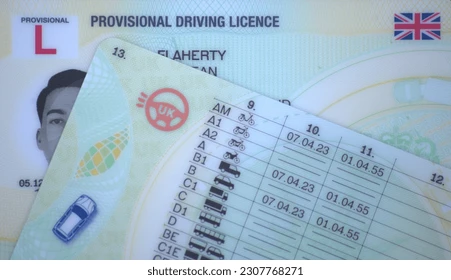
- Vehicles: A list of codes (e.g., B, C1, D) showing what you can drive.
- Endorsements: Detailed codes of offences (e.g., SP30) and the date they serve until.
Who can request this? Legally, only those with a “reasonable cause” and your permission should request a check. This covers employers (for fleet insurance), car rental agencies (for liability), and occasionally insurance brokers.
Join Thousands Who Share Licences Securely Daily
DVLA check codes are the trusted, official way to prove your driving history. Access the same system employers and hire companies use to verify licences.
DVLA Licence Check Code
For businesses, the DVLA licence check code is a risk management tool. If you employ someone to drive, you have a vicarious liability for their conduct.
As an employer, you cannot generate the code for the driver. That would require you to know their National Insurance number, which is a breach of privacy if used for this purpose without distinct authorization. The driver must generate the code and provide it to you. You then use the “Check someone’s driving licence“ tool on GOV.UK.
Selling Point: relying on manual checks where drivers email you screenshots is risky—screenshots can be photoshopped. Our compliant licence verification support service connects directly to the DVLA data stream. We automate the checking process, alerting you immediately to new points or bans, ensuring your business never faces the £1,000+ fine per driver for non-compliance.
What Is A DVLA Share Code?
“Share code” is simply another name for the check code. The terminology shifts depending on which part of the website you are on. When you are the driver, you are “sharing” your licence (Share Code). When you are the employer, you are “checking” the licence (Check Code). They are the exact same 8-digit sequence.
This code protects your data because it does not share your address or your medical details. A car hire clerk does not need to know you have a heart condition or where you live; they only need to know you aren’t banned from driving.
Where Can I Find My DVLA Check Code?
You will find your code on the confirmation screen immediately after clicking “Get a code.”
My advice for safe storage:
Since the code is temporary, treat it like a boarding pass.
- Screenshot: Take a picture of the screen on your phone.
- PDF Download: Click “Save/Print a summary.” If you are on an iPhone, choose “Save to Files.” If on Android, save to “Documents.”
- The “Check Code” Backup: If you are at a rental desk and can’t find the code, you can generate a new one on your smartphone right there using the rental office Wi-Fi.
Download Our DVLA Check Code Step-by-Step Guide
Get our free visual walkthrough showing exactly how to generate your code, what information you’ll need, and how to avoid common errors.
Check Driving Licence Points
I often use the check code service just to audit my own record. It is the fastest way to see how many penalty points you have and, crucially, when they will be removed.
Points typically stay on your driving record for 4 years, but they are only “valid” for the first 3 years for the purpose of “totting up” (reaching 12 points and getting banned).
Common Offence Codes You Might See
| Code | Offence Type | Points Range | Stay on Record |
|---|---|---|---|
| SP30 | Exceeding statutory speed limit | 3 to 6 | 4 years |
| IN10 | Using a vehicle uninsured | 6 to 8 | 4 years |
| CU80 | Breach of control (Mobile Phone) | 6 | 4 years |
| DR10 | Driving with excess alcohol | 3 to 11 | 11 years |
How Do You Check If You Are Banned From Driving?
If you are disqualified, the top of your summary screen will turn from green to red. It will state “Disqualified” and provide the date the ban ends.
Warning: Do not rely on your own memory for when a ban ends. You must wait for your licence status to officially flip back to “Valid” on this screen before driving. Driving whilst disqualified is an arrestable offence that carries a prison sentence.
If you see a ban listed that you believe is an error, check the conviction date. Sometimes, court paperwork is processed slowly. You will need to contact the court, not the DVLA, to dispute the judgment.
View Driving Licence
The “View Driving Licence” page gives you the full picture. Beyond points, it shows restrictions. For example, if you see code 01 next to your vehicle category, it means you must wear glasses or contact lenses to drive legally. Code 78 means you are restricted to automatic transmission vehicles only.
This view differs from the “Share” view. The share view is a sanitized summary. The “View” page is your personal data dashboard. I recommend checking this once a year just to ensure no administrative errors have occurred, such as a category being accidentally removed after a licence renewal.
Is There A DVLA Licence Check App?
This is a major source of frustration, but the answer is no. There is currently no official DVLA app in the Apple App Store or Google Play Store.
Any app you see claiming to check your licence is a third-party scraper. I strongly advise against using them. They require you to input your National Insurance number into unofficial software, which is a significant security risk. Always use the web browser on your phone (Safari, Chrome) to access GOV.UK directly.
Mobile Wallet Workaround:
While there is no app, you can download the PDF summary on your phone and add it to a “Files” folder or take a screenshot and favorite it in your photo album for quick access.
Check Someones Driving Licence Online
To check someone’s licence lawfully, you follow a strict three-step protocol.
- Ask: Request the check code and the last 8 digits of their licence number.
- Verify: Enter these into the employer side of the GOV.UK portal.
- Download: Save a PDF copy of the result. This is your audit trail.
The “Northern Ireland” Exception:
If the driver’s licence was issued in Northern Ireland, you cannot use the standard GOV.UK service. You must use the specific DVA (NI Direct) website. The databases are currently separate.
Selling Point: Managing these checks for a whole fleet is a nightmare of paperwork. Our secure licence audit solution centralizes this data. We verify the codes, store the audit trails compliance-compliant, and flag high-risk drivers automatically. Stop chasing paper codes and start managing risk intelligently.
Help Using The Online Service
Technology fails. If you are struggling to get a code, consult this troubleshooting table before calling the helpline.
Troubleshooting Common Errors
| Error Message / Issue | Likely Cause | Solution |
|---|---|---|
| “Details not found” | Wrong Postcode | Try your previous address (the one on the physical card). |
| “System Unavailable” | Sunday Maintenance | The DVLA often patches servers on Sunday evenings. Try Monday AM. |
| “Service is for GB licences only” | NI Licence | Go to the NI Direct website instead. |
| “Session Time Out” | Browser Idle | Refresh the page and start again; security cuts out after 15 mins. |
How To Actually Speak To Someone At DVLA?
Sometimes you cannot resolve the issue online. If the website is down and you are at a car hire desk, you can call the DVLA.
- Telephone: 0300 790 6801
- Hours: Monday to Friday, 8am to 7pm; Saturdays, 8am to 2pm.
- The “Rental Desk” Line: If you give permission, a car hire company can sometimes call to verify details verbally if the digital system is down, though this takes significantly longer.
Frequently Asked Questions About DVLA Check Code
What Is A Dvla Check Code And Why Do Employers Ask For It?
It is a security token that proves you are legal to drive. Employers ask for it to satisfy their insurer’s requirements and to ensure they aren’t employing a disqualified driver.
How Can You Check Driving Licence Points Online In The UK?
Log in to the “View or share your driving licence” service on GOV.UK using your licence number, NI number, and postcode. Click on the “Penalties” tab to see your full history.
